

Could your video speak to Uzbek-speaking viewers without losing the speaker’s meaning or character? AI video dubbing translates speech and creates a new audio track, but a fluent-sounding voice isn’t enough if the message shifts or the delivery feels unlike the original.
Plan the localization before processing the video, then review the result before publishing. Dubbing replaces the spoken audio with translated speech; subtitles display translated text; voice-over adds narration. Each format suits a different audience and viewing context.
This guide covers the path from source video to dubbed version, including translation, voice generation, subtitles, and edits. You’ll learn what to listen and look for, how voice cloning can retain aspects of the speaker’s tone and emotion, and how to catch awkward phrasing or changes in meaning. Dublyaj AI supports Uzbek, English, Russian, and more than 90 other languages, with individual line editing in Studio. Use the checks ahead to choose a format and review a localized video with confidence.
Key Takeaways
- AI video dubbing creates spoken audio in another language, helping viewers follow the video without reading subtitles.
- Choose dubbing, subtitles, or voice-over based on how your audience will watch and listen.
- Start with a clear source video and select the target language before generating a new audio track.
- Review the full video for context, then check names, meaning, and audio in any uncertain passages.
- Dublyaj AI supports Uzbek, English, Russian, and 90+ languages, with Studio editing for individual lines.
What Is AI Video Dubbing, and When Does It Help?
AI video dubbing creates spoken audio in a different language for a video. It can replace the original dialogue with a translated spoken track, letting viewers listen in a language they understand instead of relying only on on-screen text.
Plain-language definition: AI video dubbing turns a video’s spoken content into translated speech that viewers can hear in another language.
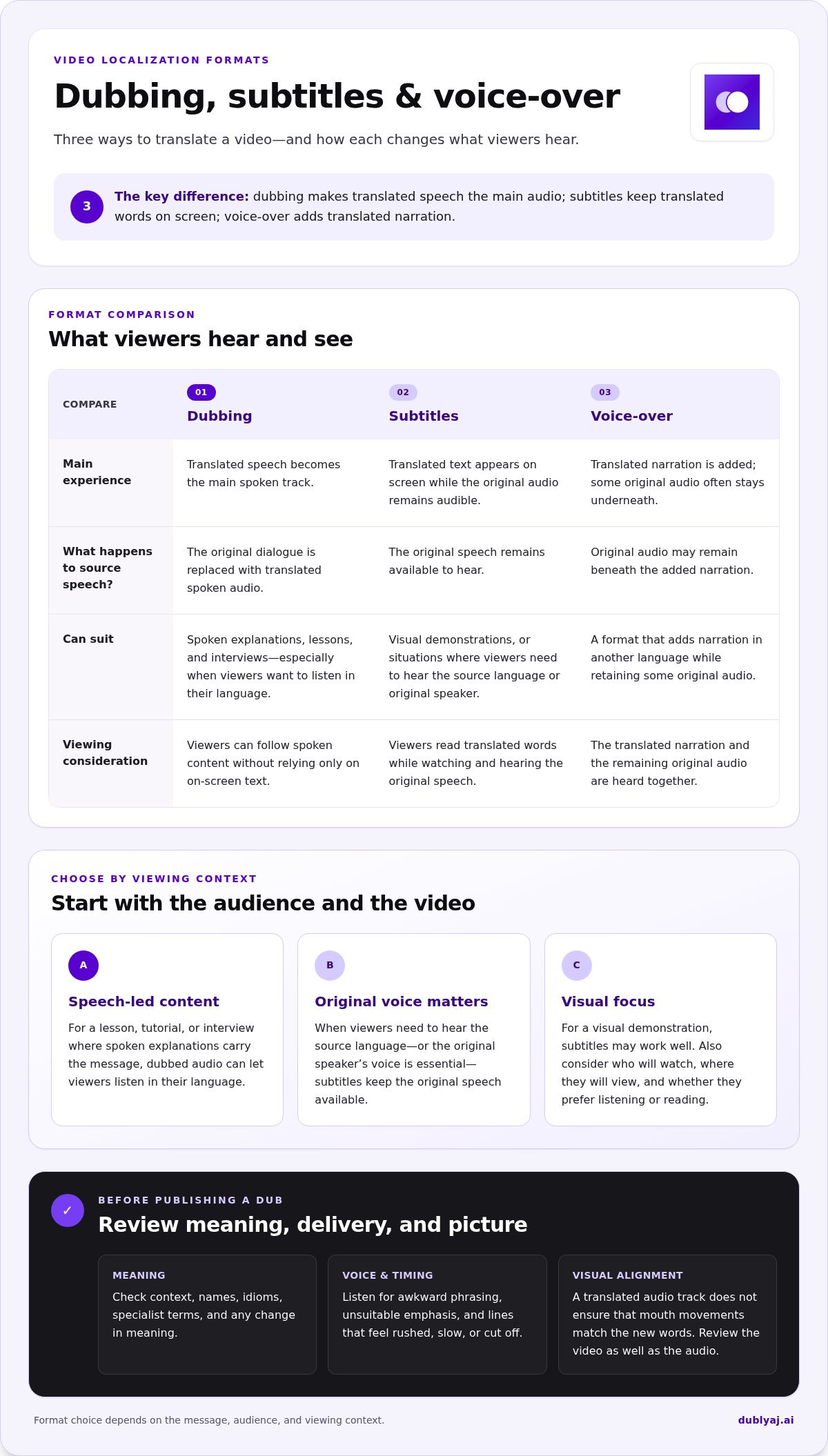
Dubbing can help when spoken explanations carry the main message, as in a lesson or interview. Subtitles show translated words while the original audio remains audible. Voice-over adds narration in another language, often while some original audio stays underneath. Dubbing generally presents translated speech as the main spoken track. These formats create different viewing experiences; the overview of Dubbing (filmmaking) also describes how dubbing relates to subtitles and voice-over.
What happens to a video during AI dubbing?
The process starts with speech in the source video. A system recognizes the spoken words, prepares a translation, then generates audio in the target language. The new track is placed with the video in place of, or alongside, the original speech. Background sounds and music may be handled separately depending on the workflow.
Voice cloning can carry qualities of the original speaker into the new track, such as aspects of their voice and delivery. It aims to retain the speaker’s character, but it doesn’t guarantee that every line will sound natural or convey the intended tone. Listen for names, idioms, emphasis, and changes in meaning.
Audio generation and visual lip-sync are separate concerns. A translated track does not, by itself, ensure that a person’s mouth movements match the new words. If close visual alignment matters, review the video as well as the audio before publishing.
Which videos can benefit from dubbing?
Interviews can reach viewers who want to follow a conversation by listening. Explainer videos and lessons can make spoken instructions easier to understand without asking viewers to keep reading while they watch. Short social videos may also benefit when the message depends on quick speech, a reaction, or a clear call to action.
Dubbing can help audiences who prefer listening in their language, including people watching on a small screen or focusing on the visuals. It may be less suitable when the original speaker’s voice is essential to the experience or when viewers need to hear the source language. In those cases, subtitles keep the original speech available.
Choose by purpose, not by habit. Consider how much the video relies on speech, who will watch it, and where they’ll view it. A visual demonstration may work well with subtitles; a spoken tutorial may be easier to follow with dubbed audio. The best format is the one that lets the intended audience understand the content comfortably.
How AI Video Dubbing Turns Source Speech into a New Audio Track
AI video dubbing follows four practical stages: provide a video, choose a target language, generate translated speech, then review the result. Each stage affects the final track, from how clearly the original dialogue is recognized to how naturally the new audio fits the scene.
- Provide the video. The system analyzes its spoken content and separates speech from other parts of the audio.
- Select a target language. This sets the language for the translated dialogue.
- Generate the dub. Recognized speech is translated, then spoken audio is created for the new track.
- Review the output. Listen for errors, check the meaning, and edit lines that need work.
From spoken words to translated speech
First, speech recognition identifies the words and represents them as text. That text is translated into the target language, then used to prepare the new spoken track. The system has to account for words and context, not just swap each word for its closest equivalent.
Names, specialist terms, and short phrases can be easy to misread or translate without enough context. A product name, for example, may be mistaken for an everyday word, or a technical term may have several possible translations. Review those details against the video’s purpose and any relevant source material.
Translated speech also needs to fit the scene. A phrase that takes longer to say in the target language may need careful wording to fit the original speaking window. Research such as the AAAI paper Speech-Duration-Controllable Machine Translation for Video Dubbing explores how translation can account for speech duration. In practice, listen for lines that feel rushed, unusually slow, or cut off.
How voice cloning affects the dubbed audio
Speech synthesis turns translated text into audible speech. Voice cloning can use qualities of the source speaker to make the new track more recognizable, including aspects of their voice, tone, and emotion. It aims to retain character, not reproduce every detail of the original performance exactly.
A calm explanation, a lively introduction, and a serious warning all rely on different delivery. Listen to whether the generated voice suits the moment and whether emphasis lands on the right words. A line can be translated correctly but still sound flat or convey the wrong feeling.
Voice cloning doesn’t guarantee identical delivery, and generated audio alone doesn’t synchronize mouth movements with the new words. To explore the process with your own video, try an AI dubbing workflow and review the generated track before sharing it.
AI Dubbing vs. Subtitles and Voice-Over: Which Format Fits?
Each format changes how viewers take in a video. Dubbing makes translated speech the main audio. Subtitles show translated text while the original speech remains available. Voice-over adds translated narration over the source speech or replaces it, depending on the edit.
| Format | Viewing experience | Typical production effort |
|---|---|---|
| Dubbing | Viewers listen to translated speech as the primary dialogue. | Translate and generate or record a new audio track, then review it with the video. |
| Subtitles | Viewers read translated text while hearing the original audio. | Translate, time, and check the text against the video. |
| Voice-over | Viewers hear translated narration layered over or replacing the source speech. | Prepare and record or generate narration, then balance it with the source audio. |
Effort depends on the video, language, and final edit. A short clip with clear dialogue may need only focused review, while a video with several speakers or specialist terms calls for closer checking. Slator’s overview of AI dubbing’s impact on global media looks at how the format is being used across media, but the right choice still depends on what your viewers need.
When should you choose dubbing instead of subtitles?
Choose dubbing when listening matters more than reading along. It can suit a spoken lesson, interview, or explainer where viewers need to watch demonstrations, slides, or a speaker’s actions while following the dialogue. Translated audio lets them focus on the visuals without having to read each line.
Subtitles are useful when keeping the original speech audible matters, such as when viewers want to hear the source language or compare the spoken words with the translation. They can also suit silent viewing or settings where audio isn’t convenient. Consider accessibility needs, screen size, sound access, and how much text viewers can comfortably follow.
When can a mixed localization approach work?
Different viewers may prefer different ways to follow the same video. You can provide dubbed audio for those who want to listen, alongside subtitle files for people who prefer reading or want the original speech to remain audible. Dublyaj AI generates subtitles and exports them in SRT and VTT formats for compatible video workflows.
Separate language versions can also help when audiences watch through channels with different audio or subtitle options. Plan around your distribution, audience preferences, and production goals. If you’re preparing a localized version, an AI video dubbing workflow can bring translated audio and subtitle options into the same process. No single format is best for every video. Match it to the content and the way your viewers will watch.
How to Prepare and Review an AI-Dubbed Video
A clear source and a focused review make it easier to catch problems before a localized video goes out. Check meaning and sound separately: a smooth, clear voice can still deliver the wrong message.
A dubbed video should be checked for meaning, pronunciation, and audio balance. Use this checklist before publishing:
- Source clarity: Can you hear each speaker clearly, without noise covering words?
- Language choice: Does the target language fit the viewers you want to reach?
- Names and terms: Are names, places, and specialist words represented correctly?
- Meaning: Does each translated line preserve the speaker’s point and tone?
- Audio: Is the speech easy to hear, with background music at a suitable level?
Prepare the source video for a smoother workflow
Start with a recording where dialogue is clear and background noise is limited. If people speak over one another or a key phrase is hard to hear, the source may be harder to interpret. Use the clearest available version of the video before starting AI video dubbing.
Choose the target language by considering who will watch, what they need to understand, and how they’ll view the video. Don’t choose a language only to increase potential reach. Keep a reference list of speaker names, product names, technical terms, and phrases that could be read in more than one way. Use it to check the translation for mistakes.
Review meaning, voice, and background audio
Watch the full video once before stopping to edit. This first pass gives you context: a phrase that sounds unusual on its own may make sense in the scene, while a fluent line may shift the point being made. Note uncertain passages, then replay them and compare the translated speech with the source and the video’s purpose.
On the second pass, check language accuracy and audio quality separately. First, confirm that the translation preserves the speaker’s intended message. Then listen for mispronounced names, awkward emphasis, abrupt pacing, or a voice that doesn’t suit the moment. Finally, check the mix. Speech should be clear, and background music should not distract from it or be difficult to hear.
If a specific line needs work, edit that line and re-render it, then listen again in the full scene. Dublyaj AI Studio supports individual line edits and re-rendering, so you can focus on the passage that needs attention instead of treating every line as a problem. Repeat the review until both the meaning and audio feel right for your audience.
Ready to put the checklist into practice? Review and dub your video, then check the finished version from start to end before sharing it.
Dub a Video with Dublyaj AI: From Upload to Localized Output
Dublyaj AI’s video dubbing workflow is straightforward: upload a video, choose a target language, and generate a dubbed version. It supports Uzbek, English, Russian, and more than 90 other languages, so you can prepare localized audio for different audiences from one workflow.
Start with the video you want to adapt. Select the language for the new speech, then generate the dub. AI voice cloning can retain aspects of the original speaker’s voice, tone, and emotion, while background music can remain part of the localized video. Review the finished version before sharing it, especially if names, technical terms, or key messages need careful checking.
Choose how to access the dubbing workflow
Use Dublyaj AI in a web browser or through the Telegram bot. Choose the access method that fits how you work, then follow the same basic path: provide the video, set the target language, and start the dubbing task.
Dublyaj AI charges per use for dubbing, with the price calculated automatically for the selected task. This lets you see the cost associated with the job rather than relying on a general estimate.
Language choice is part of the setup, not an afterthought. Choose based on who needs to understand the video. For example, a video intended for Uzbek-speaking viewers can be dubbed into Uzbek, while another version may be prepared for English- or Russian-speaking audiences. Confirm the target language and source video before starting to keep the workflow aligned with the intended version.
Review the output and prepare the next version
Once the dub is generated, listen through the video and note any lines that need adjustment. Studio lets you edit individual lines and re-render the result. You can focus on a specific phrase, such as a person’s name or a sentence that doesn’t preserve the intended meaning, instead of treating every line as an issue.
Subtitles are also available as a separate part of the localization workflow. Dublyaj AI generates subtitles and exports them in SRT or VTT format for compatible video workflows. Use them alongside dubbing when viewers need text, or as an alternative when translated audio isn’t the right fit.
For a reliable final check, play the localized video from beginning to end. Confirm the message, pronunciation, pacing, and balance between speech and background audio. If you edit a line, listen to that passage again in context before sharing the updated version.
Ready to create a localized version? Start an AI video dubbing workflow with your video and target language, then review the output before publishing.
Plan Your Next Localized Video
Your first localized release can be a useful starting point, not a final template. Choose a video that represents the kind of content you plan to share, then decide what viewers should be able to do after watching. Should they follow instructions, understand a story, or grasp a key point in a presentation? That goal gives your review a clear focus.
AI video dubbing works best as part of a deliberate publishing choice. Consider where viewers will watch, whether they can use sound, and whether translated speech or on-screen text suits the moment. After sharing, pay attention to questions or points viewers found unclear. Use that feedback to shape future versions around real audience needs.
Build a repeatable approach: start with a clear audience, review the finished video with its purpose in mind, and note what you’d adjust next time. Small, thoughtful improvements can make each localized release more useful.
Ready to begin? Start dubbing your video with Dublyaj AI. Choose your next video and take the first step toward sharing it with a wider audience.
Frequently Asked Questions
Is AI video dubbing accurate?
It can produce a useful translation, but accuracy depends on the recording and the meaning around each line. In AI video dubbing, a clear voice doesn’t prove the wording is right. For example, check whether a translated instruction still names the correct button or action shown on screen. Pay close attention to names, specialist terms, and phrases with more than one meaning, then listen again for pronunciation and pacing.
Is AI video dubbing free?
No. Dublyaj AI charges per use for video dubbing, and the price is calculated automatically for the selected task. Subtitle generation is also a paid service, with the price calculated for the task. Review the amount for your selected job rather than assuming a fixed price.
Can AI dubbing preserve the original speaker’s voice?
Voice cloning can retain characteristics of the original speaker, including voice, tone, and emotion. It doesn’t mean each generated line will sound exactly like the source performance. A question, for example, may need different emphasis in the translated language. Listen for whether the delivery still fits the moment, and compare the line’s intent with the original before using it in a public-facing video.
Does AI dubbing automatically guarantee lip-sync?
No. Creating translated speech doesn’t guarantee that the speaker’s mouth movements will match the new words. Treat audio and visuals as separate review points. Check whether the voice track is clear, then watch the speaker during close-up shots to see whether any mismatch is noticeable to your audience. Don’t assume generated audio will alter the video’s mouth movements.
Can I generate subtitles as well as dubbed audio?
Yes. Dublyaj AI offers subtitle generation as a separate service, and subtitle files can be exported in SRT or VTT format. These formats are useful when your publishing workflow supports uploading a caption file separately from the video. Choose subtitle output if viewers need text, or dubbed audio if they should listen in another language.
Can I edit an AI-dubbed video after it has been generated?
Yes. Dublyaj AI Studio lets you edit individual lines and re-render the result. This can help if a person’s name is pronounced poorly or a phrase sounds wrong beside the visuals. Review the updated line in context after rendering, since a correction can affect how the sentence flows with the surrounding speech.
Does AI dubbing keep background music?
Dublyaj AI’s voice cloning preserves background music along with the speaker’s voice, tone, and emotion. Still, listen to the final video on the device and at the volume your audience is likely to use. A mix that seems clear through headphones may feel different on a phone speaker. Check that dialogue remains understandable and that music doesn’t distract from important instructions or spoken details.
Can I use AI-dubbed videos commercially?
That depends on the rights attached to the source video, script, music, and voice. Before using a dubbed version in an advertisement, course, or monetized channel, make sure your permissions cover translation and distribution in the intended context. If the video uses licensed music or another person’s voice, review the terms that apply to those materials. This is practical guidance, not legal advice; rules and platform policies can vary.